

Push notifications are often overlooked, but when timed well, they’re one of the simplest ways to make more from every guest stay.
Whether you run a holiday park, glamping retreat, camping site, coastal resort or short-stay accommodation, your team is juggling limited time, changing weather, and a guest experience that starts long before check-in. You’ve got just a few key moments to influence decisions, and push notifications let you do that in real time.
A short message, sent at the right moment, can drive a breakfast booking. Encourage attendance at tonight’s live music. Prompt a late checkout. Or bring a guest back next year before they’ve even left.
Why push notifications work for guest-led businesses
Push notifications are short, tappable messages that appear on a guest’s home or lock screen. They see it and act.
For operators managing accommodation, activities and events, push notifications help you:
- Share last-minute changes to entertainment or activities
- Promote food and drink offers, on-site upgrades or retail events
- Direct guests to quieter spaces or timed sessions
- Highlight key moments like sunset swims, quiz night or kids discos
- Prompt rebooking or loyalty perks before guests check out
With Holidaymaker, you can schedule these messages, segment by basic guest types, and track which ones are being opened – all from your dashboard.

90% of guests at Beverley Holidays are arriving on park with the app already installed – which means there is already a relationship made with guests – before they have even arrived!
Claire Flower
Beverley Holidays
Your Essential Push Notification Guide
1. When to send for best results
Push messages need to land at the right moment to be effective. Too soon, and the guest forgets. Too late, and the opportunity’s passed.
Here’s a quick guide based on what’s working across our live parks and stays:
- Arrival info: 8AM to 10AM on day of arrival
- Food and drink offers: Between 11AM and 2PM
- Weather or access updates: As changes happen
- Entertainment reminders: 45–60 minutes before start time
- Rebooking or loyalty: Final evening or morning of checkout
If you’re not sure where to begin, start with one well-timed push per day and use your Holidaymaker data to test and refine from there.
2. How to get guests to open your notifications
Great push notifications cut through the noise by being short, clear, and genuinely helpful. If you want your messages to be welcomed (not ignored) follow these five best practices, tailored for native iOS and Android apps:
- Keep it brief – Aim for under 100 characters – guests should get the point at a glance
- Lead with the benefit – Start with what’s in it for them, not just what’s happening
- Time it right – Send your message when it’s most relevant to the guest’s stay or plans
- Be specific – Include what, where and when – no guesswork, no confusion
- Use action-led language – Phrases like “Tap to book” or “View now” make the next step clear
- Great hook – Make sure your title grabs attention straight away
A well-placed emoji can add clarity or personality, just don’t overdo it. Respect guest preferences by only sending messages to those who’ve opted in, making unsubscribing easy, and avoiding anything misleading or disruptive.
Push notifications aren’t for storytelling. They’re for guiding guests to act, clearly, quickly, and in the moment it matters most.
3. Write notification titles that get seen
Your title is the bolded line guests see first, and often the only part they read. It needs to be short, clear, and lead with value:
- Keep it under 45 characters, anything longer may get cut off on iOS or Android
- Use the title to highlight the benefit (Save 10% on your next stay) or create urgency (Rain on the way – play barn open)
- Avoid vague intros or branding fluff – get to the point
- One emoji can help add meaning, but clarity always comes first
- Make your title count – it’s the tap trigger!
4. Live examples of notifications that work
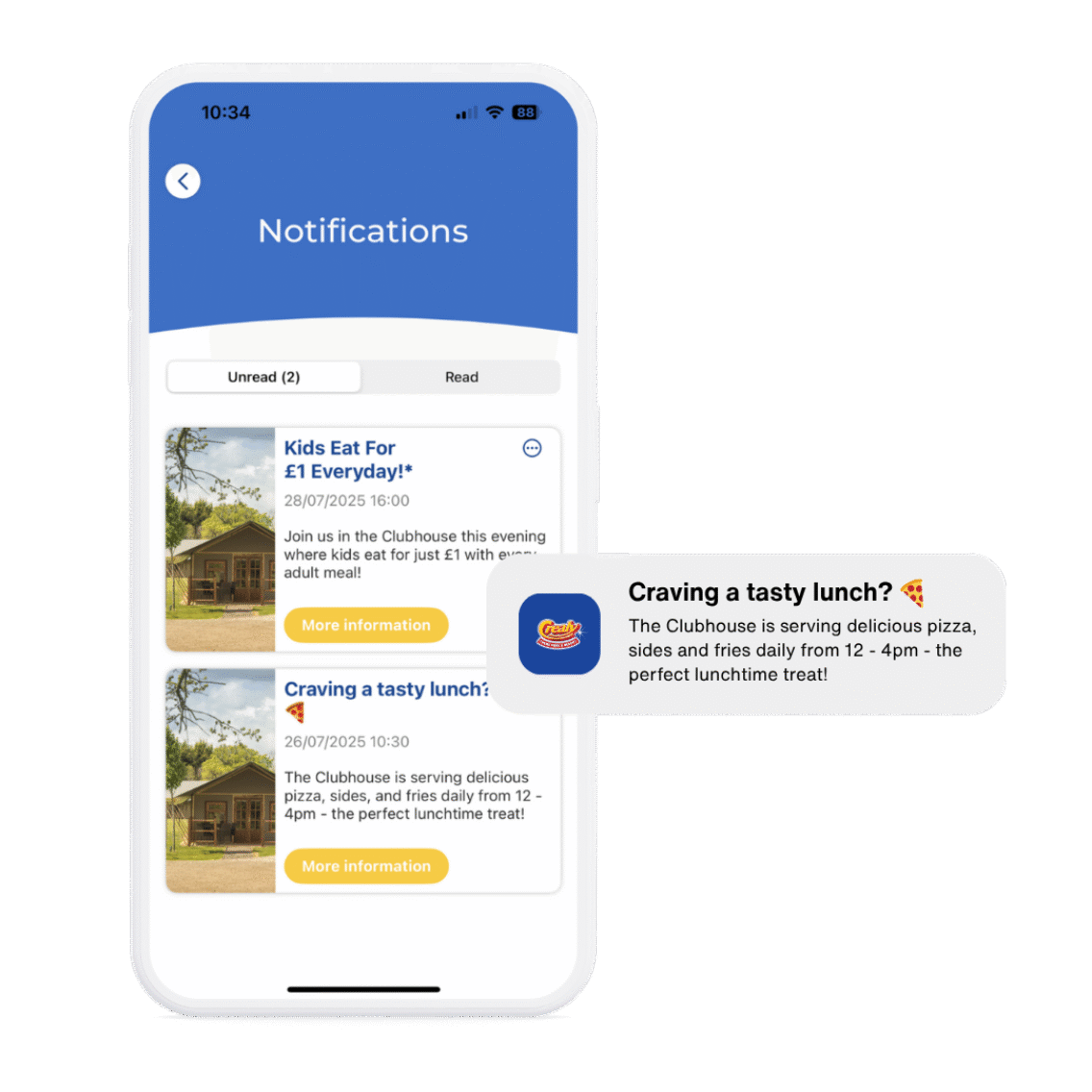
Push notifications work best when they’re timely, specific, and add value to the guest’s experience. Here’s a varied set of examples used by parks, glamping sites, and resorts:
Craving a lunchtime treat? 🍕
Don’t miss 2-for-1 pizzas tonight at The Terrace from 5PM – tap to book
Start your day with something peaceful ☀️
Morning Yoga on the meadow begins at 9AM – tap to join
Loved your stay? Let’s do it again
Rebook before you leave and save 10% on your next visit – tap to claim
Each message is even more effective when sent to the right guest at the right time – which is where segmentation comes in.
Smarter segmentation, better results
Not every guest needs to see the same message.
With Holidaymaker’s current segmentation tools, you can send messages to different guest types, OTA bookings, or guests in a loyalty scheme.
That means a family staying in a lodge might receive a late checkout offer, while a camper arriving via PitchUp sees a rebooking prompt for next year. Touring guests can be nudged to extend their stay. Owners can get event reminders.
Each message feels relevant, not random – and that improves both engagement and guest satisfaction.
What’s coming next
We’re already working on the next round of updates to make push notifications even more powerful. Here’s what’s on the roadmap:
- Push automation triggers for rebooking nudges, OTA conversion messages, and loyalty follow-ups
- Expanded segmentation tools, including group size, stay length, and spend level
- Open-rate reporting by category, so you can see which types of messages drive the most engagement
- Message template presets, to help your team send faster and stay on-brand
These features will begin rolling out later this year. If you’re already using Holidaymaker, we will be contacting you as soon as we are ready for release to go through what’s available.
Ready to get started?
Push notifications don’t need a new system. Just a little timing and the right tools.
With Holidaymaker, you can schedule messages, segment by guest type, and track performance – all within your existing CMS. It’s already built in, ready to go.
Already using Holidaymaker?
Contact Debbie at Client Services
New to the platform?
Get Started with Holidaymaker
Frequently asked questions about push notifications
When’s the best time to send a push?
It depends on what you’re saying. Morning is ideal for arrival info or breakfast offers. Late afternoon works for rebooking prompts. Entertainment reminders should go out 30–60 minutes before the event starts. You can test and refine timing using your dashboard insights.
How often should we send them?
Start with one per day. If you’re segmenting well, you may be able to send two or more – but only if both are timely and relevant. Build it up to reflect your activities, events and news.
Can we personalise messages?
Yes. You can segment by OTA bookings, direct guests, lodge owners, pre-arrival, post-stay, and more. You can also create exclusive schemes for members or staff.
Can we schedule messages in advance?
Absolutely. You can schedule push notifications for upcoming activities, food offers, or rebooking prompts right inside your CMS.
Can some push notifications be automated?
Not yet – but this is part of the next release. Automation will allow you to trigger messages based on stay stage or guest behaviour without needing to schedule them manually.
Can we send messages to people who haven’t logged in?
If they’ve installed your app and opted in to notifications, yes – you can send general updates like “View today’s activities.” For personalised messages, they’ll need to be signed in or matched to a booking.
Can we promote offers or upsells in push messages?
Yes – as long as the message is opt-in, relevant, and clearly tied to the guest experience. Apple and Google allow this. Just avoid misleading urgency like “last chance” unless it’s genuinely accurate.
What should we avoid?
Avoid generic messages with no action. Don’t over-message. Don’t push the same offer to every guest regardless of their stay type. And don’t skip the CTA – it’s the most important part of your message.
